
Cloud Guard
Improve your security posture with Oracle Cloud Guard, a service included in your Oracle Cloud Infrastructure (OCI) customer tenancy. Detect threats, pinpoint misconfigurations, and monitor insecure activity across tenancies with ease. Empower your security administrators with outstanding visibility to help swiftly resolve cloud security issues.
The journey of Cloud Guard
Learn how Cloud Guard has evolved into a Cloud Native Application Protection Platform (CNAPP) and discover the benefits of its newest capabilities.
Oracle Cloud Guard demo
Watch as Oracle Executive Vice President Clay Magouyrk demonstrates Oracle Cloud Guard and Security Zones for security posture management.
Oracle named a Leader in Gartner® Magic Quadrant™
Gartner recognizes Oracle as a Leader in the Magic Quadrant for Strategic Cloud Platform Services.
Cloud Guard benefits
-
Get a global view of your security posture
You can monitor and detect issues across global Oracle Cloud Infrastructure tenancies consisting of compartments and resources, across all subscribed regions. This enables you to adopt a cloud security posture management strategy with a global and centralized approach to help keep your OCI tenancies secure. Cloud Guard identifies problems for newly created resources and can be applied to your root compartment and inherit every child compartment and resource.
-
Integrated and automated remediation
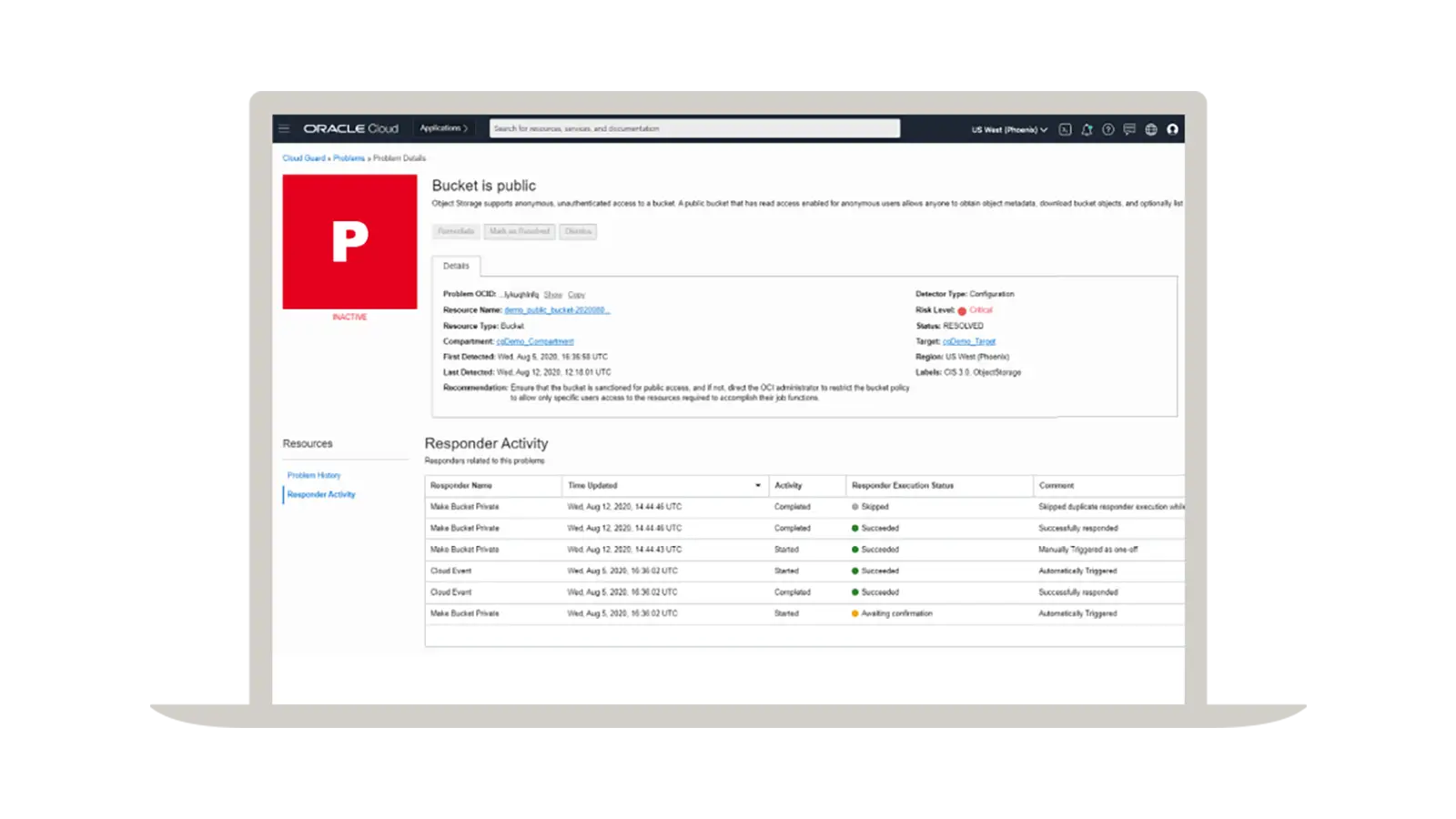
Cloud Guard provides integrated and automated remediation with detector recipes and responder recipes. A Cloud Guard responder is an action that Cloud Guard can take when a detector has identified a problem. There are two types of responders.
- Notification responder: sends problem details to Oracle Cloud Infrastructure Events Service
- Remediation responder: takes an action against a problem, either automatically or on confirmation from the user—all responder activity is logged as OCI Audit events
Users can configure responders to execute immediately or confirm with the user before executing. Users can also disable responders.
-
Integrated threat detection for user activities and user behaviors
The threat detection tool identifies critical events as problems and provides actionable recommendations for immediate response. The problems can be handled in three different ways.
- Remediated: fixed using the Cloud Guard responder
- Resolved: fixed using another process
- Dismissed: closed out
The threat detection tool proactively monitors budding incidents as they develop and gives a comprehensive view of the chain of events that drives scoring.
-
Integrate Cloud Guard with external SIEM tools
Cloud Guard allows for integration with OCI Events, OCI Notifications, and OCI Functions to provide robust extensibility. This means customers can export their Cloud Guard logs containing threat detection problem data to their centralized external security information and event management (SIEM) systems (such as IBM QRadar and Splunk) for further analysis and action. Customers also have the option to create tickets in their service management systems to address the identified problems.
Featured Cloud Guard blogs
Instance Security now available in Oracle Cloud Guard
Oracle Cloud Infrastructure (OCI) recently added Oracle Cloud Guard Instance Security to provide runtime security for workloads in your OCI Compute virtual machine (VM) and bare metal hosts. Instance Security enhances Cloud Guard with support for cloud workload protection and helps you address your security requirements with a single-pane-of-glass view of your security posture.

-
November 24, 2025
Kyverno on OKE
-
November 21, 2025
Tag, track, and trust: Smart & agile access controls with strong governance
-
November 20, 2025
Performance Impact of Enabling Confidential Computing on Oracle Cloud Infrastructure VMs
-
November 19, 2025
Distributed Databases for Always-On Business: Performance and Price Advantage with Oracle Exascale Infrastructure
Cloud Guard resources
Oracle Cloud Guard Overview
Get the latest documentation for Oracle Cloud Guard.

Join a community of peers
Cloud Customer Connect is Oracle’s premier online cloud community. With more than 200,000 members, it’s designed to promote peer-to-peer collaboration and sharing of best practices, product updates, and feedback.

Develop Oracle Cloud Security skills
Oracle University provides training and certification to ensure success, all delivered in a choice of formats.


You may also be interested in
-
Oracle Security Zones
See how Oracle Cloud Guard works with Oracle Security Zones to further enforce security policies
-
Autonomous Linux
Get to know the world’s first autonomous OS
-
Compliance
See how Oracle Cloud Infrastructure is addressing global compliance concerns
-
Oracle Cloud Infrastructure regions
See Oracle Cloud Infrastructure data center regions
Detect and remediate threats
Detect targeted malicious behavior
Oracle Cloud Guard Threat Detector helps you continuously monitor cloud environments using targeted behavior models aligned with the MITRE ATT&CK framework. Resources are profiled and sightings are created when actions match tracked techniques. Sightings are correlated and scored to provide a complete picture of attacks and their progression. Cloud Guard problems with detailed evidence and history are created for resources with elevated risk scores and can be used to trigger responder recipes or downstream workflows.
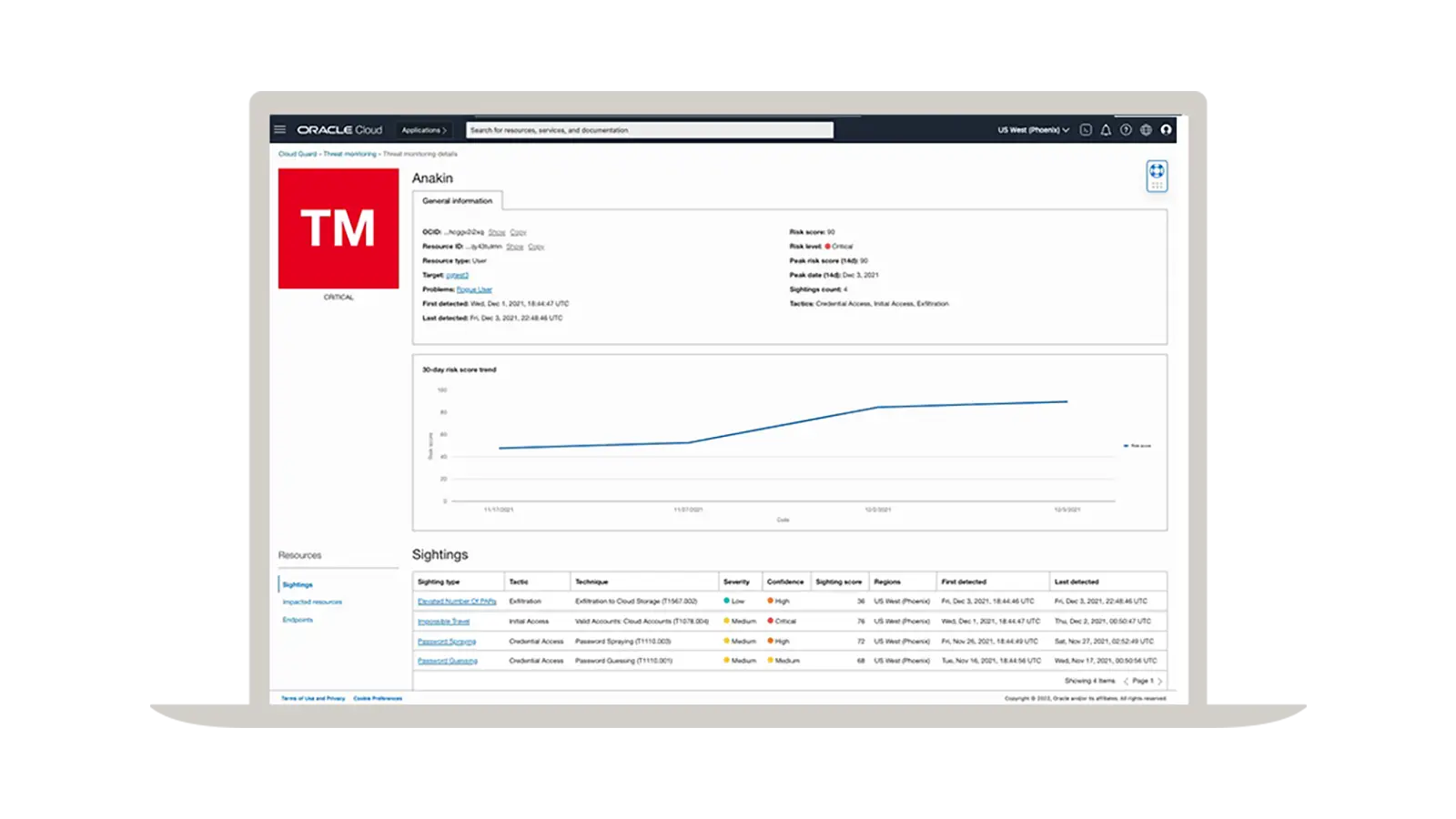
Protect customer tenancies
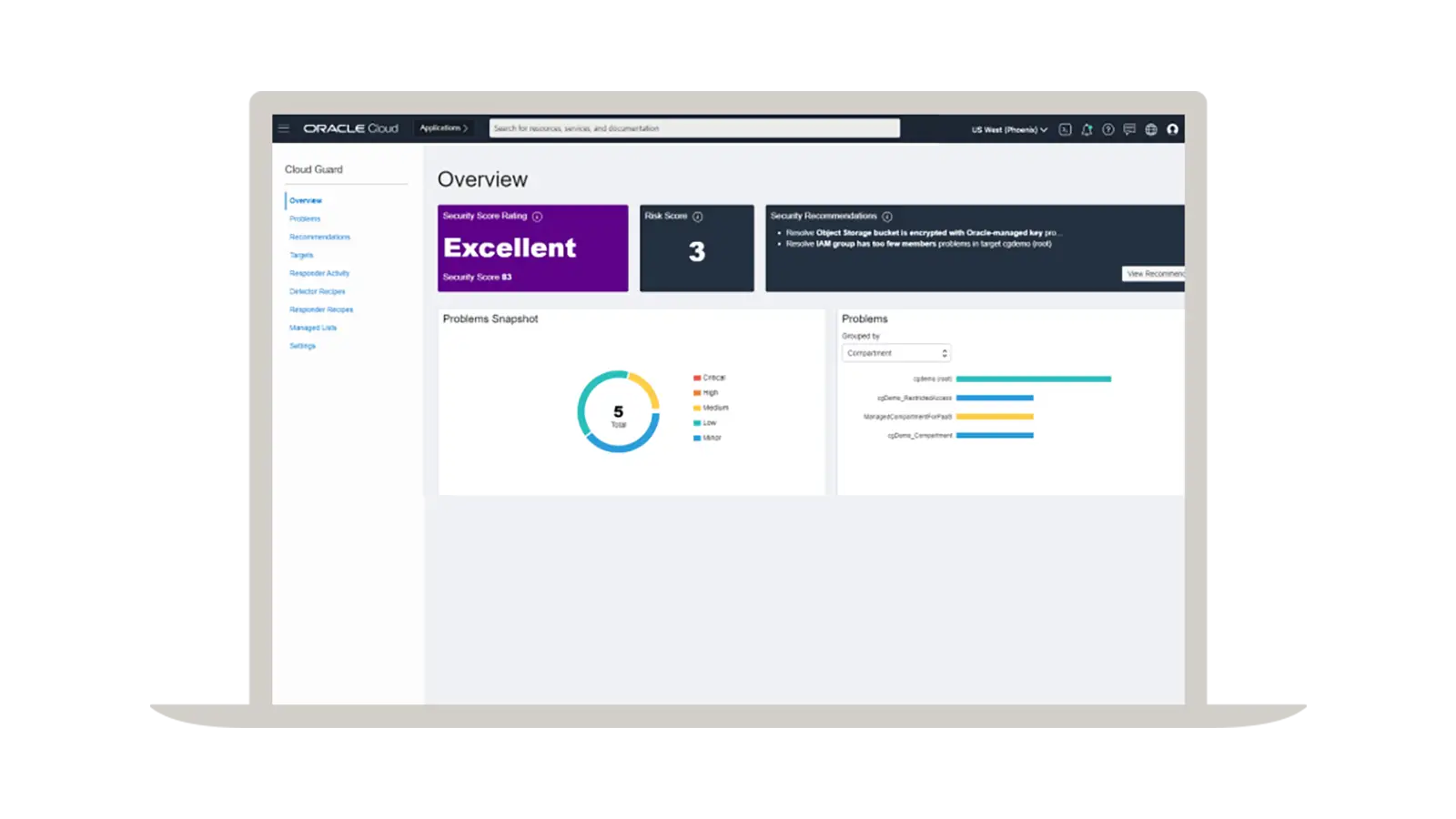
A global and centralized security approach
Adopt a cloud security posture management strategy with a global and centralized approach to help secure Oracle Cloud Infrastructure customer tenancies.
Automatically remediate security problems
Improve security operations efficiency
Automate the remediation of security threats for simple and complex issues using security recipes to help optimize your security operations team resources.
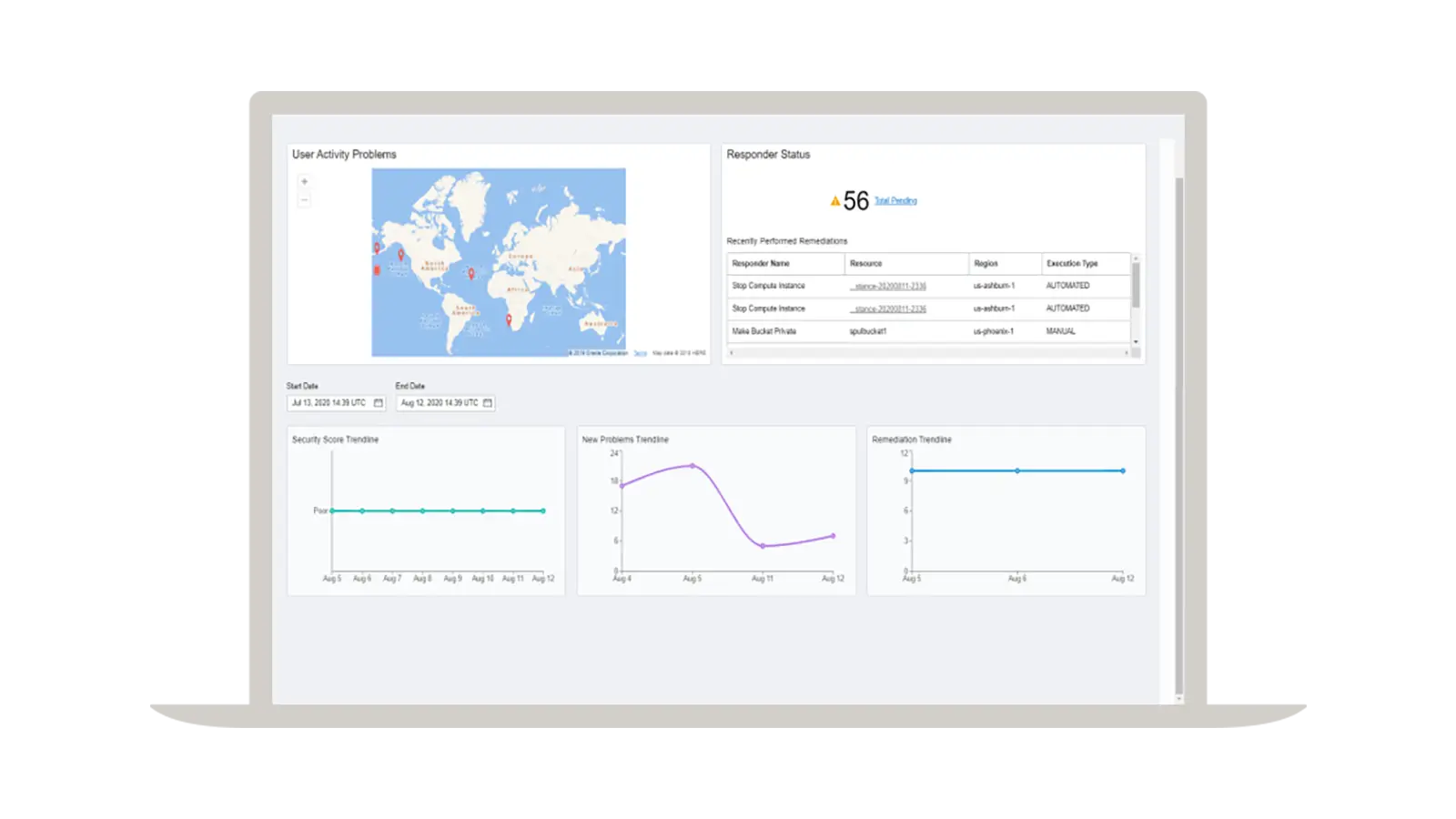
Obtain a comprehensive view of risk posture
Address high-priority cloud security issues
Assess and view the security and risk posture of Oracle Cloud Infrastructure customer tenancies with a console user interface and programmatic interfaces such as Oracle Cloud Infrastructure APIs, command-line interfaces, software development kits, and more.
Cloud Guard Instance Security
With Instance Security, Cloud Guard is expanding from security posture management to cloud workload protection, ensuring you can meet your security needs in one place with consistent visibility, near real-time protection, and a holistic understanding of your cloud security posture.
Instance Security collects and aggregates important security information about compute instances, such as security alerts, vulnerabilities, and open ports, to provide actionable guidance for detection and prevention. Customers need the ability to detect suspicious processes, open port creation, and script execution for their workloads, which requires operating system–level visibility. Instance Security provides new Oracle-managed, out-of-the box detections and customer-managed queries that can be used for threat hunting.
To get the value of Cloud Guard Instance Security in your tenancy, enable Cloud Guard and apply an Instance Security detector recipe to your in-scope compute instances.
For additional information about Cloud Guard Instance Security or how to enable it, please review the service documentation. For information on pricing, please review the pricing documentation.
Unified view of security problems
See all security problems in one place with Oracle Cloud Guard
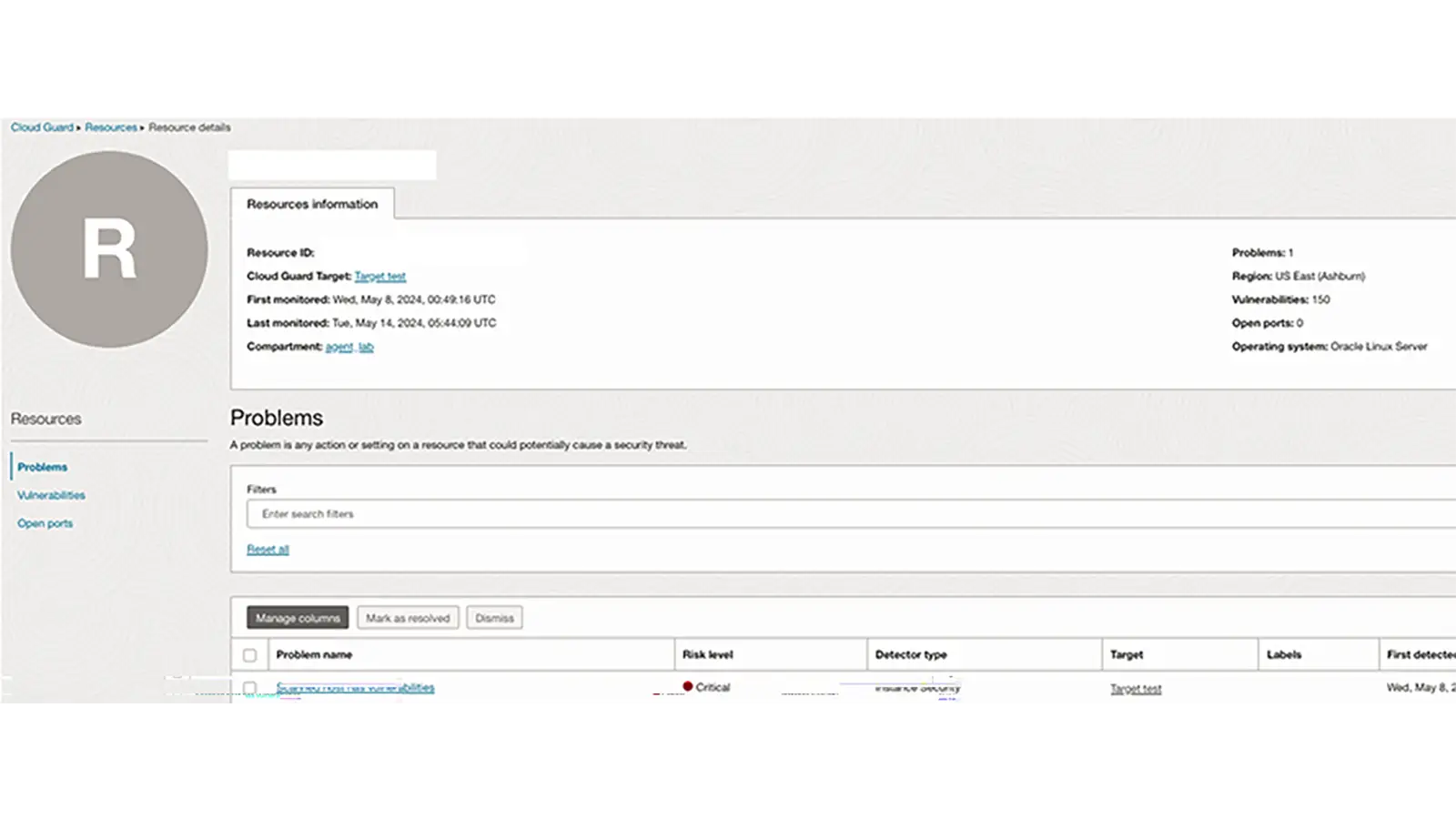
Instance Security is part of Cloud Guard. Cloud Guard’s resource view allows you to see all security problems associated with a compute instance in one place. This provides a bird’s-eye view of security problems detected using Cloud Guard, such as operating system–level vulnerabilities and open ports for individual instances.
Out-of-the-box detector rules
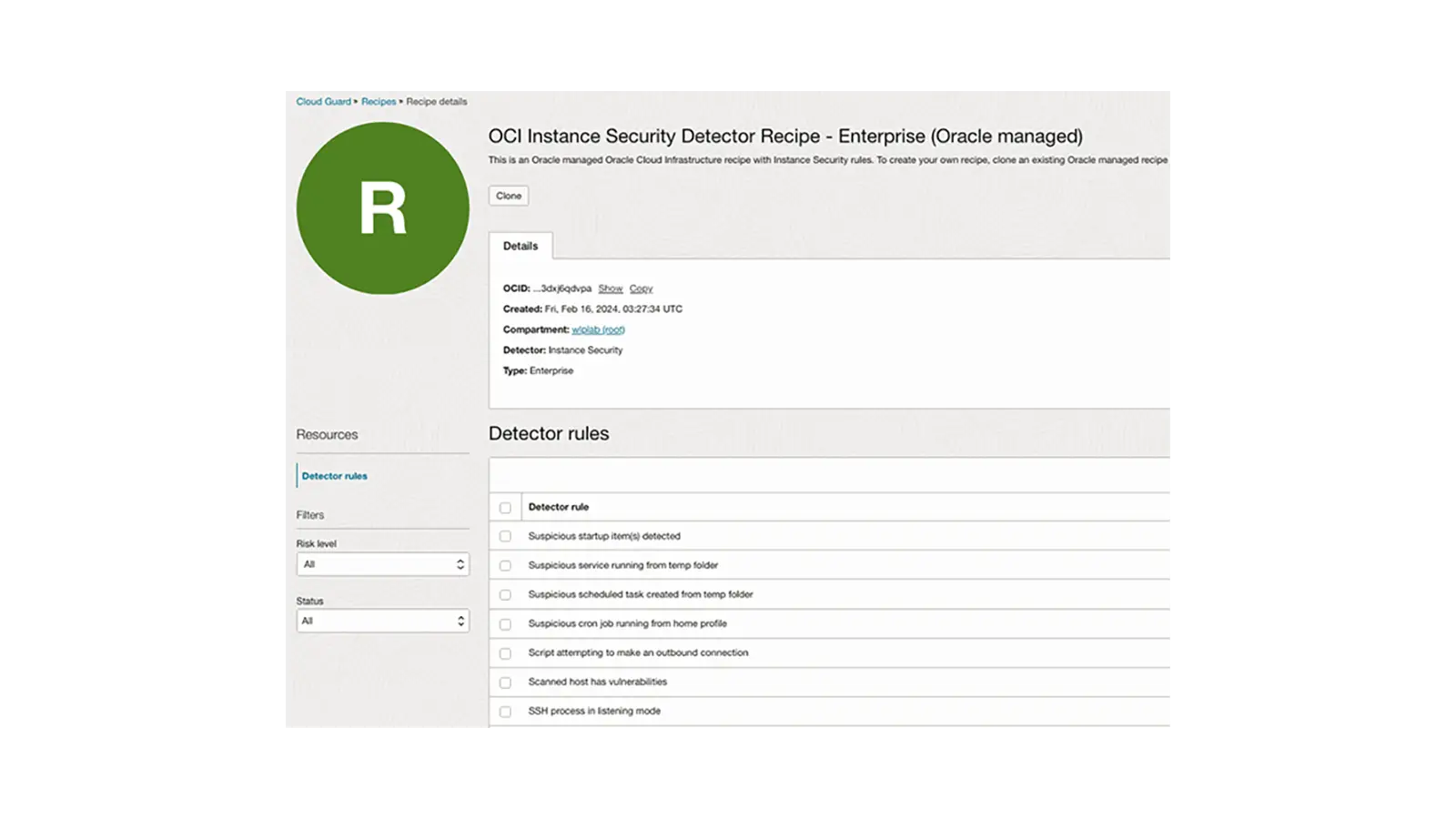
New MITRE-aligned, out-of-the-box detector rules
Cloud Guard Instance Security detector recipes monitor your compute hosts for suspicious activity. Oracle-managed, MITRE-aligned, out-of-the-box detections reduce manual effort for security analysts to help identify high-risk activities.
Instance Security customers can collect data for the purpose of detecting security anomalies and get deep insights into their operating systems, without requiring any kernel code modifications.
The detector catalog is continuously expanding to align with our customers’ needs.
Live queries
Run live queries on your hosts for detections and threat hunting
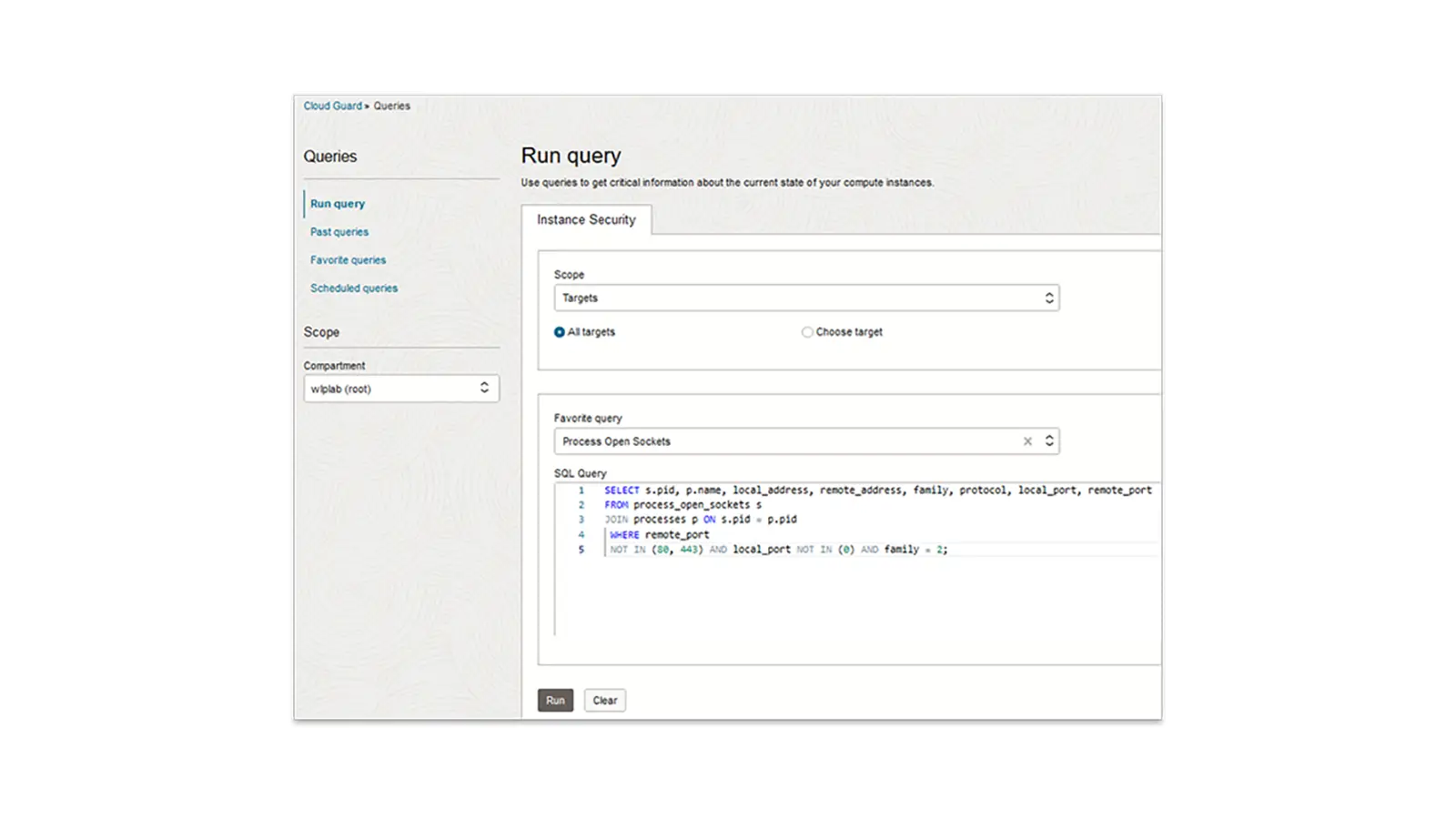
Your security operations team can run queries on compute instances on an ad hoc basis. This provides visibility into the state of the fleet.
Instance Security runs osquery (osquery 5.5.1) under the hood, which leverages a relational data model to describe an instance. Osquery is a performant, open source, multiplatform software that helps you gain visibility and insights into your fleet. It can collect and normalize data independently of the operating system, increasing visibility across your infrastructure.
Osquery has hundreds of out-of-the-box tables that provide information about an instance, ranging from running processes to loaded kernel extensions. Instance Security supports a majority of the open source osquery tables in addition to custom-built Oracle Cloud Infrastructure (OCI) tables.
Scheduled queries
Schedule queries on your hosts for your compliance and audit needs
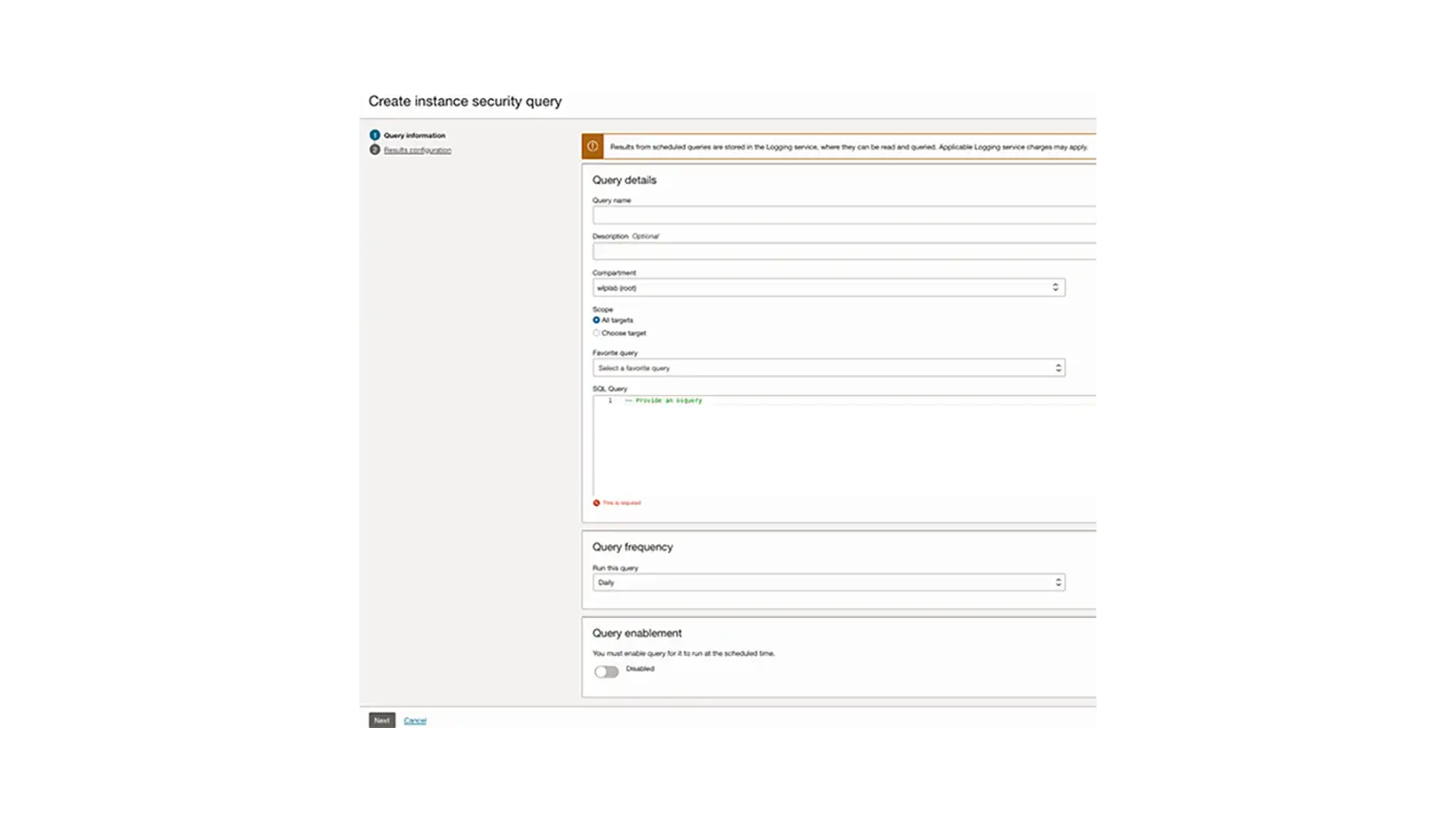
After you’ve run a query and are happy with the result, you can schedule the query to run periodically.
If you have compliance requirements that require you to inspect your instances and provide evidence of the security controls in place, you can use scheduled queries. Instance Security integrates with the Oracle Cloud Infrastructure Logging service, and you can configure it to send your raw data to a SIEM or third-party data aggregator from OCI Logging.
General
What is Oracle Cloud Guard?
Oracle Cloud Guard helps customers maintain good security posture by detecting weak security configurations and activities that can indicate cloud security risks.
Cloud Guard detects security problems within a customer tenancy by ingesting audit and configuration data about resources in each region, processing it based on detector rules, and correlating the problems at the reporting region. Identified problems will be used to produce dashboards and metrics and may also trigger one or more provided responders to help resolve the problem.
Responders can mitigate, correct, and prevent security issues based on a problem.
How do I enable Cloud Guard?
Cloud Guard is available by default within your Oracle Cloud Infrastructure (OCI) tenancy and can be accessed from the OCI Security console. Here are the steps for enabling Cloud Guard for the first time:
Pre-Requisites: Cloud Guard is not available for free Oracle Cloud Infrastructure tenancies. Ensure that you have a paid tenancy before you attempt to enable Cloud Guard.
For the complete set of other pre-requisites please refer to https://docs.oracle.com/en-us/iaas/cloud-guard/using/prerequisites.htm
- From the Top-level menu, go to Security -> Cloud Guard
- Click on Enable Cloud Guard
- Add the required Oracle Identity and Access Management (IAM) policies by clicking on Add Statements, then press Enable.
- You should now see the Cloud Guard overview page.
- Data collection will begin and update the contents of the page as the tenancy’s security configuration is assessed globally.
How much does Cloud Guard cost?
Cloud Guard for OCI Configuration and OCI Activity is provided free of charge for supported OCI services.
Is Cloud Guard a regional or global service?
Cloud Guard is implemented regionally and aggregates problems to the customer-selected reporting region to provide a global view.
Which regions are monitored?
All commercial regions for the tenancy will be monitored regions. Please see here for a list of currently supported regions here: https://docs.cloud.oracle.com/en-us/iaas/Content/General/Concepts/regions.htm
Can I change the reporting region?
Yes, the reporting region can be changed by disabling Cloud Guard and re-enabling Cloud Guard in another region. Cloud Guard configuration and data will not be moved if the reporting region is changed.
The reporting region can only be selected during Cloud Guard enablement. So, if a customer needs to change the existing reporting region, they can disable Cloud Guard and choose the same or a different reporting region during the re-enablement process.
Please note that when you try to re-enable Cloud Guard with a different reporting region, there is a wait period of approximately 20 minutes; this is because a resource sync up must happen across regions.
Does Cloud Guard show me any metrics that indicate my current Security Posture?
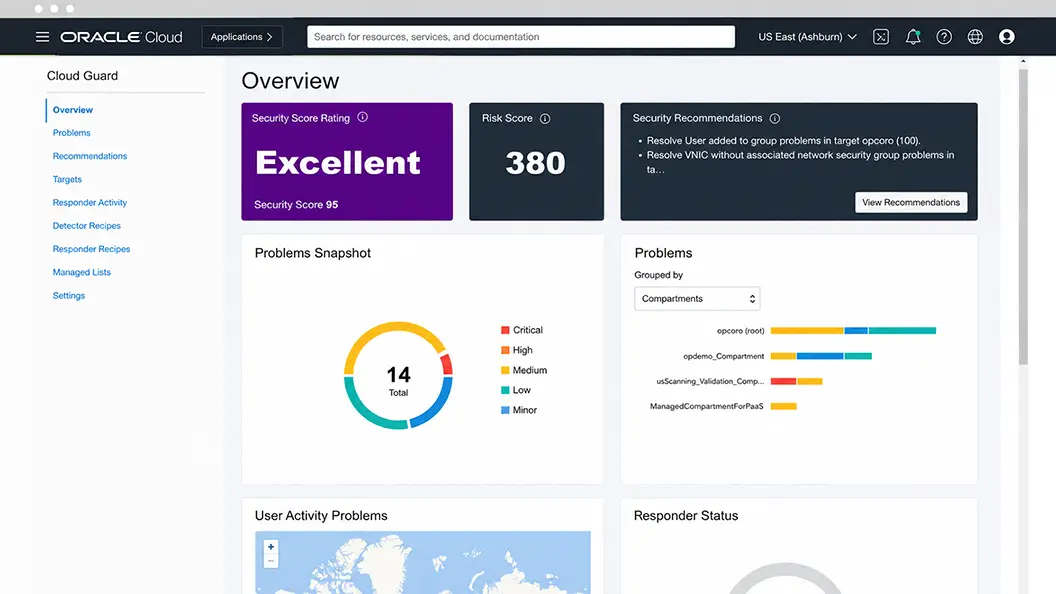
Yes, Cloud Guard provides two key metrics the Risk Score and the Security score as part of the Overview page in the Console. Security Score is a normalized value ranging from 0-100 that uses the number, types, and severity of problems to determine an overall assessment of the strength of security posture. Risk Score complements the Security Score by evaluating the number of total resources being monitored, the sensitivity of each resource type, and the severity of any problems related to the resources to determine the total risk exposure of a tenant. These are used to help assess what could be “small but insecure” and “large but overall secure” environments correctly.
What kind of compliance standards does Cloud Guard support today?
Cloud Guard aligns with the CIS Foundations benchmark standard for OCI. Additional compliance features are expected post-GA.
What’s the difference between Cloud Guard and other OCI SIEM-like services and tools?
SIEMs and Cloud Guard are complementary services. Cloud Guard provides security posture assessment and security monitoring of OCI tenancy by ingesting audit/log data and by monitoring the configuration state of resources. OOTB detectors are provided and enabled by default in Cloud Guard that help detect the problems for your resources. SIEM based services ingest log data from resources and applications and provides support for search/analytics engine to perform forensic investigations and potentially identify new indicators of risk or custom event discovery. Cloud Guard’s automated remediation features (aka Responders) can be configured and initiated by Cloud Guard whereas actions should be defined as part of the rules construct for the SIEM tools.
How can Cloud Guard integrate with my SecOps and incident response processes?
Most customers want cloud security monitoring to integrate with existing processes, procedures, and people. Many InfoSec teams will integrate Cloud Guard problems with their internal SIEM tools to tie Cloud Guard problems with their internal processes. These integrations may use the Cloud Guard APIs, and/or existing OCI Infrastructure services such as OCI Events, OCI Notifications, and OCI Functions. Cloud Guard can be Events to trigger (e.g.) sending problems to email, Slack, and PagerDuty as well as to custom OCI Functions. Customers can also use the Events to OCI Functions to build custom integration or responses based on customers' use-cases.
Oracle Cloud Guard quick-start guide
Oracle Cloud Guard detects misconfigured resources and insecure activity across tenants and provides security administrators with the visibility to triage and resolve cloud security issues. You can enable Cloud Guard with just a few clicks.
Step 1
Launch Cloud Guard
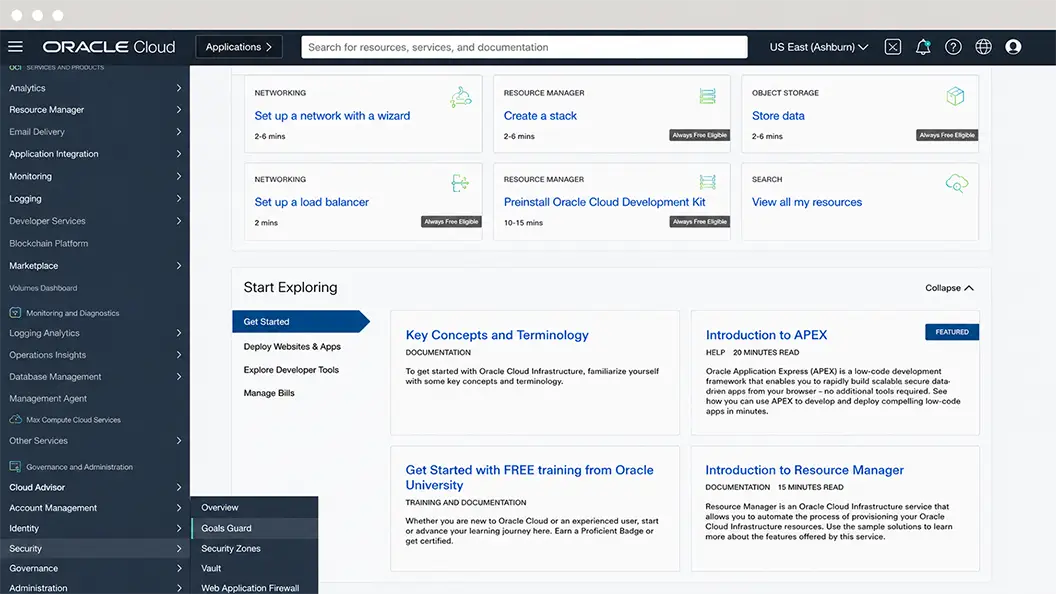
Launch the Cloud Guard dashboard by going to Security > Cloud Guard in the Oracle Cloud menu.
Step 2
Enable Cloud Guard
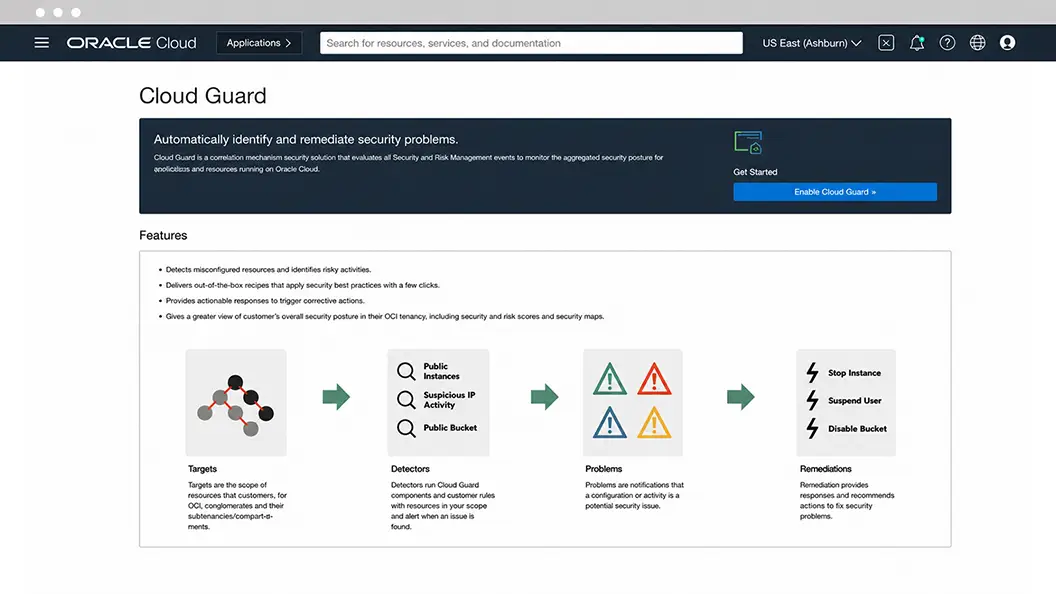
On the Cloud Guard page, click the Enable Cloud Guard button at top right.
Step 3
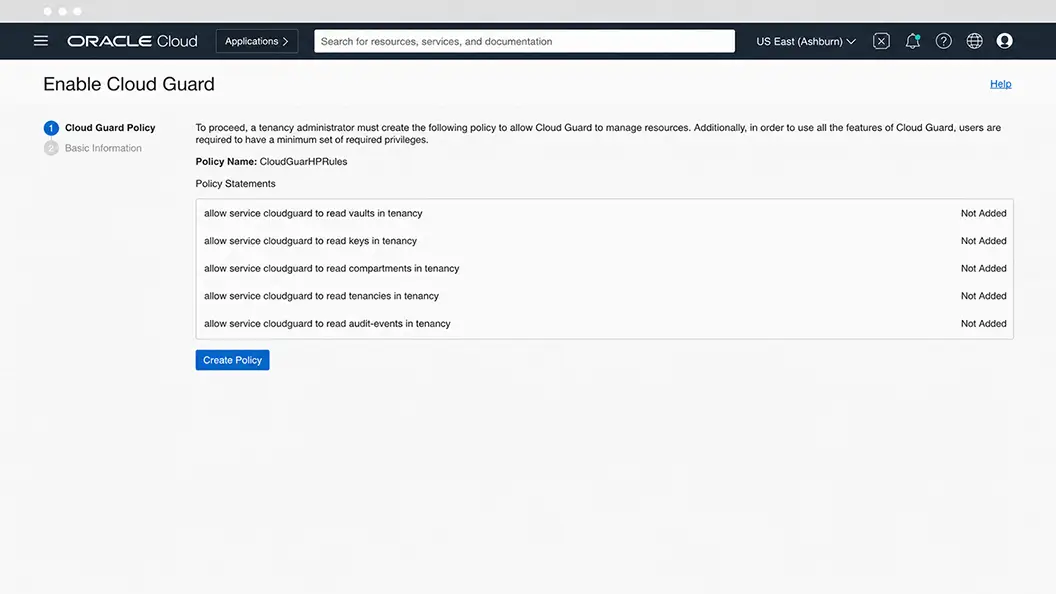
Create the policies to manage resources
Add the required identity and access management policies for Cloud Guard to monitor the resources in the tenancy and press the “Create Policy” button. Once the policies are enabled, select the “Next” button.
Step 4
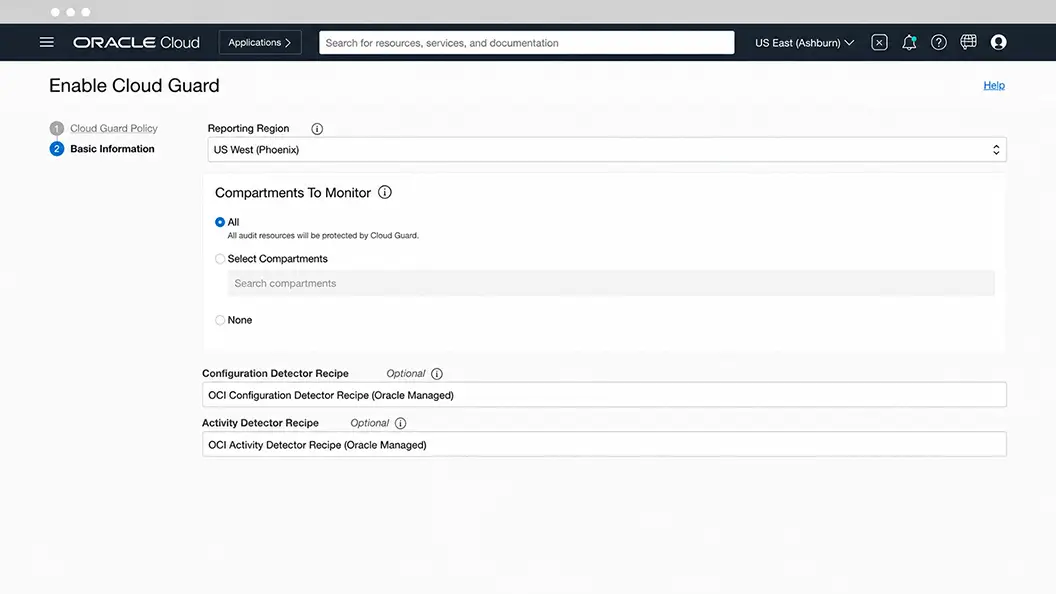
Configure the regions and compartments to monitor
Select the Region and compartments you want Cloud Guard to monitor.
Step 5
Start monitoring your resources for security weaknesses
Click the Enable button at the bottom of the screen. Cloud Guard will now monitor your resources for security weakness related to configuration and will suggest, assist, or take corrective actions, based on your configuration.
With Cloud Guard you can gain a unified view of cloud security posture across your Oracle Cloud Infrastructure tenants. Oracle Cloud Guard detects misconfigured resources and insecure activity across tenants and provides security administrators with the visibility to triage and resolve cloud security issues.
An Oracle Cloud Infrastructure user with the appropriate privileges is required to manage Cloud Guard resources. For details on the privileges required and other prerequisites, visit our our prerequisites page.